Back to Packages
Slides Manager
Creates groups of slides, synchronize titles and sections. Extract slides for review.
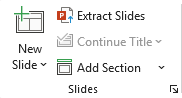
Creates groups of slides, synchronize titles and sections. Extract slides for review.
Creates a list of slides from you own text on a slide (list of paragraphs)
If you have a flat list - only slides will be created, if you have list with levels, 1st level will produce sections
How to Create Slides from a List with levels
1. In a text placeholder/textbox, create a list:
Level 1 items will become Section titles
Level 2 items will become Slide titles
2. Select the placeholder containing the list.
3. On the toolbar click New Slide - Slides from Paragraphs
The add-in will generate slides based on your list structure.
Saves selected slides to a separate presentation in one click
How to Extract Slides
Choose slides you want to save separately and click
Extract Slides
New Presentatuion with the chosen slides is created
Marks the selected slide as a continuation by updating its title.
Choose between a sequence number (1/2, 2/2) or a "Contd." suffix.
How to make a sequence of slides with the same title
Select the slides that should share the same title.
Click Continue Title and choose a suffix format — either a sequence number (1/2, 2/2) or "Contd."
The titles of all selected slides will be updated with the chosen suffix.
Note: The title is taken from the first slide in the selection. Make sure the first slide has the correct title before applying.