Back to Packages
Select Similar
Pick one reference object, select all the matching ones at once, and apply your change to them together.
Pick one reference object, select all the matching ones at once, and apply your change to them together.
MotivationThe Problem: When dealing with crowded slides or imported assets, making a sweeping design change means hunting down and manually selecting every individual object. One wrong click, and you have to start all over again.
Our Solution: Our "Select Similar" tool introduces intelligent batch selection. Pick a single reference object, instantly isolate all matching elements based on your criteria, and apply your changes globally.
Pick one shape and select every shape like it in one click, so you can restyle them all at once instead of clicking through a busy slide.
How to Use Select Similar
Note: Inside a group, only the shapes of that group are selected. Ctrl+click Select Similar to open the Selection Pane.
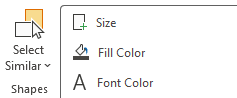
When you want shapes that share one property only, whatever else they look like, pick that property yourself.
How to Use Select Similar By
Note: Inside a group, only the shapes of that group are compared. Font Size and Font Color go by the font the text starts in, and skip shapes with no text.