MotivationEven the best corporate templates have their limits. When a standard layout doesn't fit your content, the Quick Layouts package lets you instantly clone and tweak existing layouts to match your exact needs. Pair it with our Align package to effortlessly build custom column structures and achieve the perfect design.
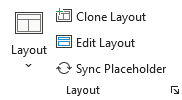
How to Use Clone Layout
Select the slide whose layout you want to copy.
Click Clone Layout — a dialog box will appear.
Enter a name for the new layout and click Create.
If Open layout for editing after creation is checked, Slide Master view will open automatically so you can edit the layout right away.
Note: The new layout is an exact copy of the original. Any further changes will only affect the new layout.
Gives quick access to Slide Master View
How to Use Edit Layout
Select the slide whose layout you want to edit.
Click Edit Layout.
Slide Master View will open with the corresponding layout already selected — ready to edit.
How to Use Sync Placeholder
Select the placeholder(s) you want to sync to the layout.
Click Sync Placeholder.
In the dialog, choose what to update on the layout:
Position and Size
Text Style
Shape Style
Click Update.
A prompt will ask whether to apply the changes to all slides using this layout — confirm to update them all at once.
Note: This lets you update layout placeholders without opening Slide Master view. Works only for Placeholders, not Text boxes