Back to Packages
Slide Number Refs
Insert a reference like "see slide 7", where the number is a live link to that slide.
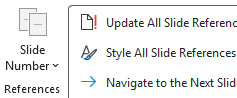
Insert a reference like "see slide 7", where the number is a live link to that slide.
Point the reader to another slide with see slide 7, where the number is a live link to that slide.
How to Use Slide Number
The slide's number is inserted as a link: click it in a slideshow to jump to that slide.
Note: The button is available only while you are editing text, and the deck needs at least two slides.
Slides get moved and added, and the numbers in your references go stale. One click puts every reference back on the right number.
How to Use Update All Slide References
References to a deleted slide are also marked #NA when you save the presentation, so they never end up jumping to the wrong slide.
Slide References Count in the same menu shows how many references the presentation has. Navigate to the Next Slide Reference selects them one after another, to check them in place.
Note: Web links and PowerPoint's own slide links that show their own text are left alone.
Show slide references as plain text that blends in with the sentence around it, or as clearly marked links.
How to Use Style All Slide References
The references stay clickable either way.
Note: Where a reference has no text around it, as alone in a table cell, only the underline is removed; color it by hand.