Back to Packages
Continue Title
Continue a title across a series of slides, numbered (1/3) or marked Contd, and renumber the whole run when you add a slide.
Continue a title across a series of slides, numbered (1/3) or marked Contd, and renumber the whole run when you add a slide.
A topic that runs over several slides needs the same title on each, numbered so the audience knows where they are. Continue Title writes it for you, and renumbers the whole run when you add one more slide.
How to Use Continue Title
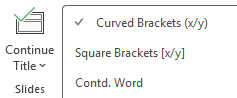
Choose the Numbering Style
Note: The style is saved in the presentation, so whoever continues the deck next gets the same numbering. A new presentation starts with Curved Brackets (x/y). The title is taken from the first slide in the run that has one. Slides whose layout has no title placeholder are refused.