Back to Packages
Workbook Index
Put every sheet on one page, linked and grouped into sections, and jump straight back. Plan on the index and generate the sheets.
Put every sheet on one page, linked and grouped into sections, and jump straight back. Plan on the index and generate the sheets.
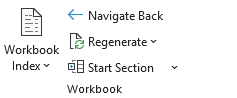
MotivationOnce a workbook grows past a dozen sheets, the tabs at the bottom stop helping: you scroll, squint and click through to find the sheet you need. Workbook Index puts every sheet on one page — titled, linked and grouped into sections — and Navigate Back takes you straight back to where you were.
The index also works the other way round. Plan the workbook on it — add, rename and reorder rows — and Generate Sheets makes the workbook match.
One sheet that lists every sheet of the workbook, with a link to each, grouped into sections.
How to Use Workbook Index
Note: The index lists the visible worksheets to its right. Sheets placed before it, such as a cover, are not listed.
Group the sheets of the index under section titles, so a long workbook reads like a table of contents.
How to Use Start Section
In the same menu, under Options:
Note: Start Section works on the index only. Remove Section deletes a divider sheet only when it holds nothing but its title.
Plan the workbook on the index, then let it build the sheets: new rows become new sheets, edited names rename them, and the order of the rows becomes the order of the tabs.
How to Use Generate Sheets
Note: Sheets are never deleted — a sheet removed from the index is moved to the end. The changes cannot be undone; reopen the saved workbook to go back.
Already have a styled contents sheet? Make it the index and keep its look.
How to Use Use Active Sheet as Index
Note: The first section row and the first sheet row set the look of every row of their kind — format those two.
Choose what each column of the index shows.
How to Use Map Index Sheet Cell
Note: Column A holds the index's keys and cannot be mapped.
The index shows each sheet's title, read from the same cell of every sheet — B1 unless you choose another.
How to Use Define Sheet Title Cell
Note: A title typed on the index is written into that cell of its sheet by Generate Sheets.