Back to Packages
CleanUp Tools
Find what quietly makes a workbook heavy and slow, unused cell styles and broken range names, and clear it.
Find what quietly makes a workbook heavy and slow, unused cell styles and broken range names, and clear it.
MotivationA workbook passed around for a year carries everything anyone ever did to it. Hundreds of cell styles nothing wears, left behind by pasting from other files. Range names pointing at columns somebody deleted. None of it shows anywhere, and all of it makes the file slower to open, heavier to send and likelier to break — until Excel starts refusing to do things and nobody can say why.
CleanUp Tools finds it and clears it. Open Check for Issues and every problem the workbook has is listed: the cells showing
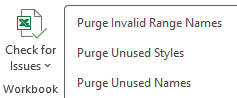
#REF!,#VALUE!and other errors, sheet by sheet; range names past their limit or broken; cell styles past theirs. Review them, go to them, fix them in bulk — in a window that stays open beside your work. Or take the cleanups straight from the menu when you already know what needs doing.Nothing is deleted on a guess. A style goes only when no cell on any sheet — hidden ones included — is wearing it, and the name commands list what they are about to remove and ask first.
A workbook edited by a dozen people for a year carries the evidence: formulas quietly showing #REF! where a number used to be, range names pointing at columns somebody deleted, and hundreds of cell styles nothing wears. It gets slow, it gets wrong, and nothing in Excel tells you where. This finds all of it in one window, and fixes it there.
How to Use Check for Issues
Note: Excel can't undo these changes, so each one asks first. Error cells are found on every sheet, hidden ones included — those can be fixed but not gone to. Range names count as a problem past 300 or when any is broken, cell styles past 100. A name only a macro uses looks unused, so check the list before deleting.
The same clearing the report offers, as one-shot commands — for when you already know what needs doing and would rather not open a dialog to do it.
How to Use the Purge Commands
#REF!, or a formula that is only an error value.Note: Excel's own built-in styles are never touched, and a style counts as used if any cell on any sheet wears it, hidden sheets included. The name commands protect Excel's own names (Print_Area, _FilterDatabase, _xlfn.…), slicer, timeline and data-model names, hidden names, and Doxpro's own markers. "Unused" is judged across every formula, name, chart series, conditional format and validation rule — but a macro's use of a name cannot be seen from here, which is exactly why the command asks before it deletes.