Back to Packages
Change Case
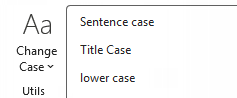
Change text case in Excel cells in place, with no formulas: UPPER, lower, Title and Sentence case. Re-case a whole column or just part of a cell.
Change text case in Excel cells in place, with no formulas: UPPER, lower, Title and Sentence case. Re-case a whole column or just part of a cell.
MotivationWord and PowerPoint have long let you select arbitrary text and change its case. Excel has never had that functionality — this package brings it to Excel.
Word and PowerPoint have always let you re-case selected text. Excel never has, so a column of SHOUTING headers meant retyping it. Now it is two clicks.
How to Use Change Case
The four cases:
Note: Only cells that hold text are changed. Numbers, dates and formulas in the selection are left alone — including a formula whose result is text.
One word in the cell is wrong, not the whole cell. Highlight just that part and re-case it, leaving the rest of the text as it is.
How to Use Change Case Inside a Cell
Only the characters you highlighted change, even when the same word appears again elsewhere in the cell.
Note: Anything other than text on your clipboard — a copied picture or a copied range — is lost when you use this.